OSI Academic Org Structure changes in Canvas and UTS Open
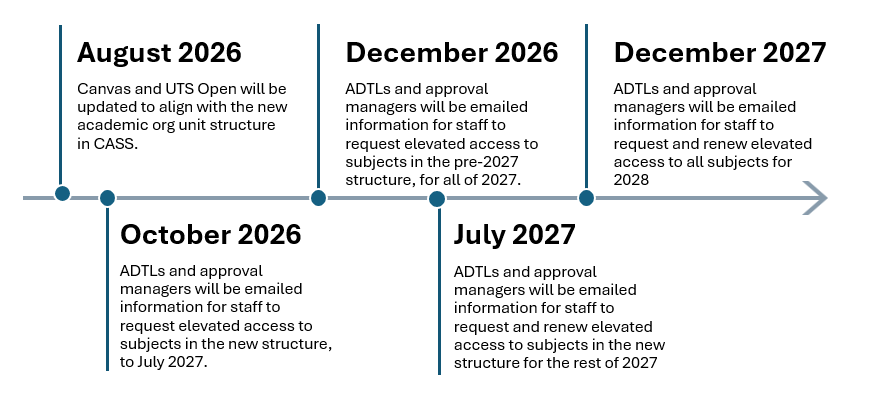
The UTS OSI program includes changes to the Academic Org Structure. These changes are being implemented in IT systems starting with CASS on August 19 2026.
From late August 2026 onwards, two separate sets of faculty structures will be maintained in Canvas – the current structure and the new OSI Academic Org Structure for 2027 sessions onwards. This is required so that teaching and learning can continue for subjects being taught in 2026 sessions (for example in DAB and FASS) through to the end of Summer Session 2026 in February 2027.
At the same time subject provisioning and enrolment for 2027 sessions will be transitioned to the new Faculty, School, and Discipline structure (for example Design and Society) in preparation for the first 2027 teaching session, Session 1 2027, in January 2027. This will also provide sufficient time for professional support staff to adapt to the changes, while ensuring continuity of operations, accurate record-keeping, and any necessary adjustments during the transition period.
Please note: only 2027 subject availabilities onwards will be provisioned and enroled in the new OSI Academic Org Structure.
During this transition period, some professional staff in elevated roles will need to retain their existing access while also being granted access to the new faculty sub-account structure, enabling them to work effectively across both environments. To support this change and maintain the security of our Canvas instances, we have introduced new OSI-based access request forms earlier than the usual end-of-year access review cycle. This ensures that access permissions remain current, appropriately governed, and aligned with operational requirements throughout the transition.
Canvas
- Week of August 26: The new three level structure will be created in Canvas in addition and separately from the current one in order to maintain separation of elevated access in future sessions.
- Faculties and Schools under the current structure will have “2026” appended, until the conclusion of the Summer 2026 session, after which this will change to “archive”. This is so that faculties with the same name under the current and future structures can be differentiated while navigating in Canvas.
- Access for elevated roles will now be assigned at the Faculty, School and Discipline level.
- Selection of Faculties, Schools or Disciplines on the role request forms will be made according to the CASS code structure for 2027. A translation of the codes to names will be on the form and can also be found here under Academic org unit data https://studentutsedu.sharepoint.com/sites/CassProject/SitePages/Academic-org-changes.aspx#important-documents-and-links
UTS Open
- Week of August 19: The existing structure will be updated only at the faculty level including the addition of the new Design and Society faculty, plus some minor changes required to match CASS.
- Access for elevated roles will continue to be assigned at the faculty level.
New OSI based Structure
At the end of September 2026, ADEs, faculty representatives, and managers will receive a communication containing a link to the forms to request elevated access to the new OSI academic org unit structure (including FDS) in Canvas:
- Elevated access to Learning and Teaching Systems – New OSI Structure 2026-27
- Authorised access to Learning and Teaching Systems – New OSI Structure 2026-27 (Faculty Admin, Grade Faculty Admin, Subject Viewer faculty based roles)
Elevated Access Request Process
Following are key dates:
- September 28 – October 9: Forms are open for bulk approval
- October 9 (EOB): Forms are closed temporarily until October 23
- October 12: ADEs, delegates and approval managers will be emailed spreadsheets of requests in their area for their approval
- October 16: Bulk approvals due
- October 22: Approved requests will be processed
- October 23: Forms will re-open for ad hoc requests ongoing.
In July 2027, ADEs, faculty representatives, and managers will receive a communication containing the new forms relevant to their elevated access requirements for Canvas in the new OSI structure, including FDS. The access approved through this process will remain valid until December 2027, when it will be renewed for 2028.
Pre-2027 Canvas Structure:
In December 2026, ADEs, faculty representatives, and managers will receive a communication containing a link to the forms to request elevated access to the pre-2027 academic org unit structure (including DAB and FASS) in Canvas, for 2027:
- Elevated Access to Teaching and Learning Systems
- Authorised access to Teaching and Learning Systems (Faculty Admin, Grade Faculty Admin, Subject Viewer faculty based roles)
In December 2027, ADEs, faculty representatives, and managers will receive a communication containing a link to the forms to request elevated access to the pre-2027 academic org unit structure (including DAB and FASS) in Canvas, for 2028.
There is no plan at this stage to retire the Pre-2027 structure. Access will be able to be requested and approved for as long as there is a need for access to historical data.